The signals are scattered
A dip in attendance, two weak tests and a few missed homeworks each look minor on their own. Together, they’re a student in trouble.
Early warning for schools and coaching centres
NexFoc reads the attendance, marks, homework and teacher notes you already record. It flags who needs help and explains why, gives each student a recovery plan, and shows you whether it worked.
The problem
The warning signs were there for weeks, spread across the attendance register, the marks sheet and a teacher’s notebook. Nobody had the time to put them together.
A dip in attendance, two weak tests and a few missed homeworks each look minor on their own. Together, they’re a student in trouble.
Without an early flag, extra support starts after the results come out, when the student is already a term behind.
Remedial classes and retests happen, but few institutions can say which students actually recovered.
One student’s term
Illustrative example
Week 2
Attendance starts slipping
Week 3
Homework goes missing
Week 4
Two weak tests. NexFoc flags the student.
Week 8
Term exam. Most institutions find out here.
How it works
One loop, running every day, so no struggling student goes unnoticed and no intervention goes unchecked.
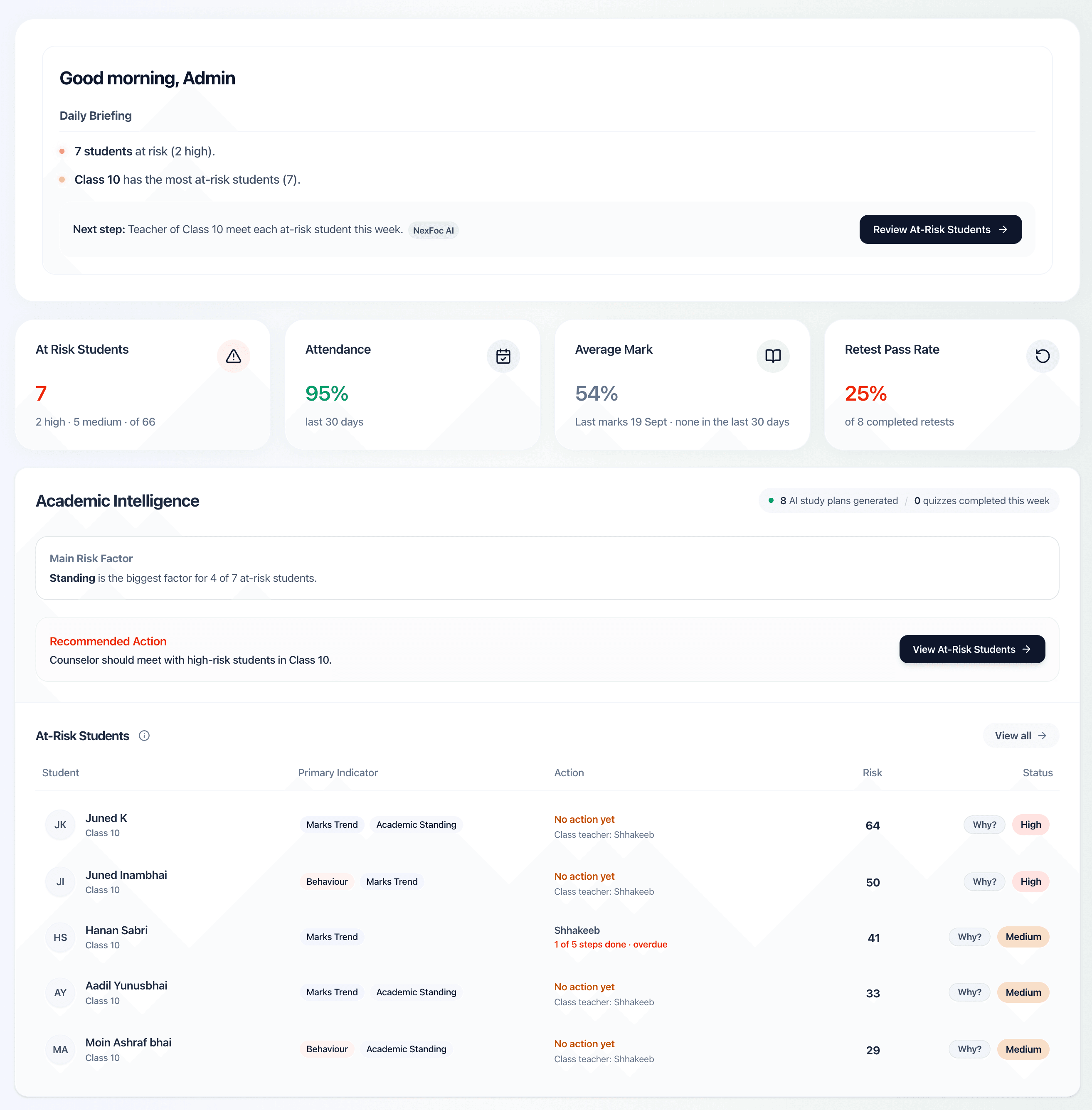
Every night, and whenever marks or attendance are saved, NexFoc rescores each student and flags who needs attention, with the reasons in plain language.
Teachers get a daily action queue and every flagged student gets a recovery plan, so each flag turns into a next step with an owner.
NexFoc tracks whether flagged students got back on track, how retests went, and whether the flags matched what happened in the exams.
01 · Notice
No black box. The early warning score is built from clear rules across five signals, and every flag states exactly why it was raised.
Scores refresh every night and whenever marks or attendance are saved. A signal with no data is left out of the score, never counted as “no risk”.
Illustrative example
Class 10 · Student A
57
High riskWhy this student was flagged
Points by signal
02 · Act
For each weak subject, students work through the same clear loop. And NexFoc only calls them recovered when a real test says so.
The recovery loop
One per weak subject
Find the gap
The chapter from the failed test, or a quick chapter check when the test covered the whole syllabus.
Learn
A short lesson with a worked example on that chapter.
Practise
Drills start at Easy and move up or down with every score.
Master
80% or more on a Medium or Hard drill, with spaced revision scheduled automatically.
Back on track
Only when the next real test in that subject is at 60% or above.
Progress comes from the student’s records, not a checkbox.
Each student’s week puts their weakest subjects first and works around the assessments coming up in the next two weeks.
Drills draw on your institution’s questions first. AI writes new ones only to fill the gaps, and they join the bank for teachers to review.
Weekly goals are marked done by what the student actually did: sessions attended, drills completed, chapters mastered.
Students see their improvement and effort acknowledged, so the plan feels like progress rather than punishment.
Follow-through
A flag is only useful if someone acts on it. NexFoc turns each one into a clear next step, with an owner.
Each teacher opens one list: students to check on, retests due, remedial quizzes to send and parents to contact.
Up to three attempts linked to the original test: standard, then with reference material, then open book. A failed final attempt is escalated.
Alerts for absences, missed homework and students needing support are written for you. Staff check each one and send it from their own WhatsApp.
Mark homework as submitted, late, missing or excused. A pattern of missed work feeds straight into the early warning.
Reports
Bring the right level of detail to every review meeting, from a whole-school view down to one student’s record. Export any report to PDF or Excel.
Presence by student, class and date range.
One learner’s results by subject, attendance and teacher remarks over time.
Class-by-class results and topic analytics that show where to focus.
How each class is doing, and how it compares.
Teaching activity and the outcomes in their classes.
Attempts, pass rates and who is still working to recover.
03 · Prove
Most tools ask you to believe their predictions. NexFoc checks its own. After each term exam, it compares who was flagged two weeks earlier with who actually failed a subject, and shows which signals really told them apart.
After each term exam: of the students flagged two weeks before, how many struggled, and how many who struggled had been flagged.
Every student flagged for at least a week, and whether they are back to low risk now.
Intervention outcomes, retest pass rates by attempt, and category moves month by month.
One platform, three views
Leaders, teachers and students each get the view that helps them act.
See where risk is building, who is helping each student, and whether flagged students are recovering.
One daily list replaces chasing spreadsheets: who to check on, what’s due and which parents to contact.
A personal recovery plan, short lessons and practice that adapts to how they’re doing.
Who it’s for
Choose daily or per-session attendance when you set up, and switch on Star Board, appreciation letters or behaviour records only if you want them.
Daily attendance, term exams, homework and parent updates, with risk seen class by class.
Attendance by batch session and frequent test cycles. Flags a student who starts missing sessions in a row, before they quietly drop out.
Subject-by-subject plans for each learner and regular updates parents can see the value of.
Questions
Something we haven’t covered? .
No. The early warning score is rule-based and transparent: every flag lists its reasons, such as a drop in attendance or two failed tests in a row. AI is used to write short lessons and practice questions for students. Decisions about support stay with your teachers.
No. NexFoc works alongside it. Students, teachers, marks and attendance can be imported from Excel or CSV, and teachers can also record them directly in NexFoc.
Marks and attendance are enough to begin. Homework, teacher notes and behaviour records make the picture sharper. A signal with no data is left out of the score rather than counted as “no risk”.
No. NexFoc drafts alerts for absences, missed homework and students who need support. A member of staff reviews each one and sends it from their own WhatsApp, so nothing reaches a parent unseen.
Only what’s needed to write learning content: the board, class, subject and chapter. Student names and contact details are not included in AI requests.
The Results page tracks how many flagged students recover, how interventions and retests turn out and, after each term exam, how closely the flags matched the students who actually struggled.
You start with the core loop: early warning, interventions, retests and results. Star Board, appreciation letters and behaviour records are optional modules you can switch on when you’re ready.
A walkthrough of the leader, teacher and student experience, focused on how your institution works.